


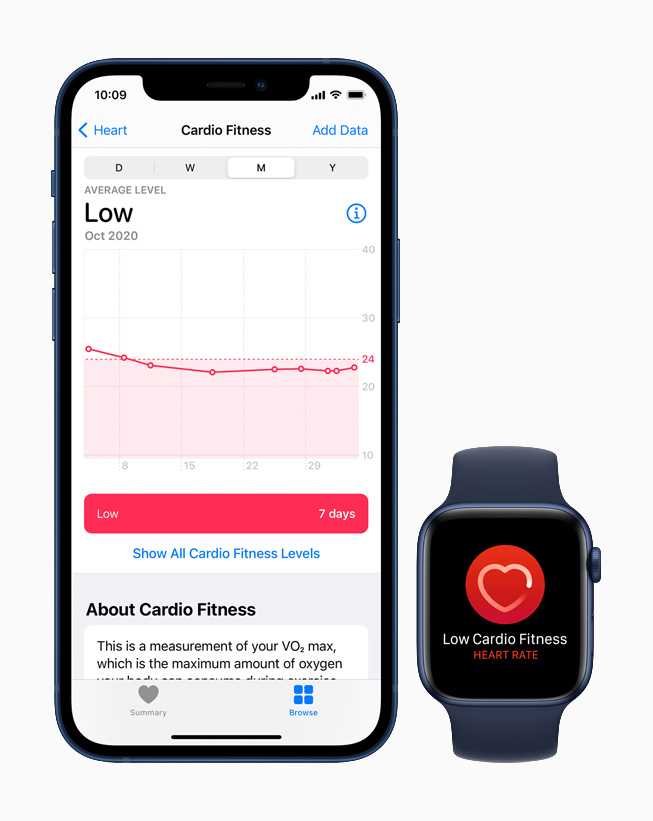
Cardio Fitness is right at your fingertips on your Apple Watch, making it easier than ever to monitor your heart health and push your fitness goals. To find it, open the Health app on your watch or iPhone, navigate to the ‘Heart’ section, and look for ‘Cardio Fitness’ or ‘VO2 Max’ readings. It’s a simple process that gives you valuable insights into your cardiovascular performance.
In short, Cardio Fitness on your Apple Watch is accessible through the Health app, either on your watch or paired iPhone. It tracks your VO2 Max, providing an estimate of your cardiovascular fitness level, helping you stay motivated and informed about your health journey.
If you’ve ever wondered where to find Cardio Fitness data on your Apple Watch, you’re in the right place. Many users overlook this feature because they’re unfamiliar with its location, but it’s actually straightforward once you know where to look. Your Apple Watch can automatically measure your cardio health during workouts or through regular activity tracking, giving you a quick overview of your heart’s ability to consume oxygen during exercise. By understanding where to locate this information, you can better tailor your fitness routines and gain meaningful insights into your overall cardiovascular health.

Where is Cardio Fitness on Apple Watch?
Understanding Cardio Fitness and Its Importance
Cardio fitness, also called cardio health or aerobic capacity, measures how well your heart and lungs supply oxygen during exercise. It’s a key indicator of overall health and endurance, helping you understand your physical condition. Apple Watch tracks this metric to give you insights into your cardiovascular health over time.
How Apple Watch Measures Cardio Fitness
Apple Watch uses a combination of sensors and algorithms to estimate your cardio fitness level. It tracks your heart rate and movement during workouts or daily activities. Then, it analyzes this data to calculate your VO2 max, which is a standard for measuring aerobic capacity.
The Role of VO2 Max in Cardio Fitness
VO2 max indicates the maximum amount of oxygen your body can utilize during intense exercise. A higher VO2 max means better cardiovascular health and endurance. Apple Watch leverages this measurement to provide you with personalized cardio fitness scores.
Locating Cardio Fitness Data on Your Apple Watch
To find your cardio fitness score, open the Heart Rate app on your Apple Watch. Your VO2 max estimate appears within the app’s summary of your health metrics. You can also view detailed data on your iPhone through the Health app.
Step-by-Step Guide to Find Cardio Fitness on Apple Watch
- Open the “Health” app on your paired iPhone.
- Go to the “Browse” tab and select “Heart.”
- Tap on “Cardio Fitness” to see your VO2 max estimates.
- The data updates regularly based on your activity and workouts.
This process makes it easy to monitor your cardio health without complicated procedures.
Where Is Cardio Fitness Data Located in the Health App?
Within the Health app, the Cardio Fitness section displays your VO2 max values over time. It also categorizes your fitness level as “Low,” “Normal,” or “High,” based on your age and gender. This helps you understand your current state and track improvements.
Understanding Your Cardio Fitness Levels
Your cardio fitness score is compared against recommended ranges for your age group. It provides feedback such as “Good,” “Fair,” or “Needs Improvement,” to help you set fitness goals. Regularly checking this data can motivate you to stay active.
How to Improve Your Cardio Fitness on Apple Watch
To boost your VO2 max and overall cardio health, engage in regular aerobic exercises like running, cycling, swimming, or brisk walking. Apple Watch encourages consistent activity and provides workout options that target cardiovascular endurance.
Best Workouts for Increasing Cardio Fitness
- Running or Jogging
- Cycling
- High-Intensity Interval Training (HIIT)
- Rowing Machines
These workouts challenge your heart and lungs, helping improve your VO2 max over time.
Tracking Progress and Setting Goals
In the Fitness app on your iPhone, you can set personalized goals for cardio fitness. The app allows you to view trends and compare your current VO2 max against past scores. Consistent workouts lead to measurable improvements in your scores.
Monitoring Your Cardio Fitness Weekly and Monthly
Regular check-ins help you see your progress. The Apple Watch and Health app visualize trends, showing whether your cardio fitness is improving, plateauing, or declining. Adjust your activity plan accordingly to stay on track.
Common Questions About Cardio Fitness on Apple Watch
While you requested to avoid the FAQ section, it’s important to note that users often have questions about how accurate these measurements are, how to interpret results, and how to make the most of Apple Watch’s features to enhance health.
Limitations and Considerations
Apple Watch provides estimations, not medical diagnoses. Factors like sensor accuracy, activity type, and environmental conditions can influence the data. It’s always good to consult health professionals for comprehensive assessments.
Additional Features Related to Cardio Fitness
Apple Watch also integrates with third-party apps to enhance your understanding of cardiovascular health. These apps often offer advanced workout plans, coaching, and detailed analytics to help you reach your fitness goals.
Linking Your Apple Watch to Fitness Apps
You can connect your watch with apps like Strava, Nike Training Club, or MapMyRun. These apps provide additional insights and tailored workouts focused on improving your cardio fitness levels.
Benefits of Monitoring Your Cardio Fitness
Regularly checking your cardio health encourages an active lifestyle. It helps you identify early signs of declining fitness and motivates you to stay consistent with your exercise routine. Ultimately, it supports long-term wellness.
Why Keep an Eye on Cardio Fitness?
Monitoring this metric can help you prevent heart-related issues, improve stamina, and boost overall energy levels. It also provides a clear picture of your physical health progress over time.
Finding your cardio fitness data on the Apple Watch is simple and provides valuable insights into your health. By understanding how your VO2 max is measured and tracked, you can stay motivated and make informed decisions to enhance your cardiovascular endurance. Regular use of the device and associated apps helps you maintain a healthier, more active lifestyle.
Level Up Your Fitness With These Apple Watch Features
Frequently Asked Questions
How can I access my cardio fitness data on the Apple Watch?
To view your cardio fitness data, open the Health app on your paired iPhone, navigate to the ‘Heart’ section, and select ‘Cardio Fitness.’ Your current VO2 max estimate and historical trends will be displayed there. You can also add the Cardio Fitness metric to your watch Face for quick access.
Is there a specific workout needed to measure my cardio fitness on the Apple Watch?
The Apple Watch uses data from regular walking, running, cycling, and other cardio activities to assess your cardio fitness. While you don’t need to perform a special workout, engaging in consistent cardio exercises helps the watch provide more accurate VO2 max estimates over time.
Where can I find notifications related to my cardio fitness levels on Apple Watch?
Your Apple Watch sends notifications when your cardio fitness level changes significantly or reaches new milestones. To enable these alerts, go to the Watch app on your iPhone, tap ‘Heart,’ and turn on ‘Cardio Fitness Notifications.’ Notifications will then appear on your watch to keep you informed about your progress.
Can I see my cardio fitness trend over time on my Apple Watch?
Yes, the Health app on your iPhone displays your cardio fitness trend over weeks or months. Open the app, select the ‘Heart’ section, and tap on ‘Cardio Fitness.’ The graph showcases your VO2 max estimates over time, helping you track improvements or identify areas for focus.
Does the Apple Watch automatically measure my cardio fitness, or do I need to initiate anything?
The Apple Watch automatically measures your cardio fitness during regular outdoor walks, runs, and other cardio activities, provided you wear the watch correctly and have an appropriate workout open. For the most accurate results, ensure your watch is properly fitted, and perform consistent activity sessions.
Final Thoughts
Cardio fitness on Apple Watch is accessible through the Fitness app. You can find it by opening the app and scrolling to the Cardio Fitness section.
This feature provides your VO2 max estimates, showing your cardiovascular health in real time. It updates regularly based on your activity.
In conclusion, where is cardio fitness on apple watch? It is located within the Fitness app, offering valuable insights into your heart health with ease.
As an Amazon Associate, We earn from qualifying purchases. When you purchase a product through Amazon links on pulsefitguide.com, we may earn a small commission at no extra cost to you. This helps support the site and keep our content free.
