


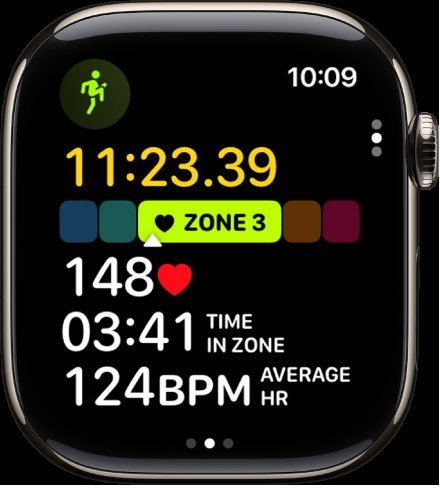
The answer is simple: tracking your zone 2 cardio on an Apple Watch helps optimize your fitness. If you want to improve endurance without overexertion, understanding how the ‘zone 2 cardio apple watch’ feature works is key. It guides you to maintain a moderate effort that burns fat and builds stamina.
With real-time heart rate monitoring, your watch ensures you stay in the right zone. This data keeps your workouts efficient and effective. Staying aware of your zone 2 intensity makes it easier to reach your fitness goals comfortably.

Understanding Zone 2 Cardio with Apple Watch
When it comes to improving your fitness and health, knowing how to work out at the right intensity is essential. Many fitness enthusiasts and beginners alike are turning to tools that help monitor their workout zones. One popular device for this purpose is the Apple Watch, especially when it comes to tracking Zone 2 cardio. This zone is often considered the sweet spot for building endurance, burning fat, and boosting overall cardiovascular health. In this article, we will explore everything you need to know about Zone 2 cardio and how your Apple Watch can be an effective companion in your fitness journey.
What is Zone 2 Cardio?
Before diving into how your Apple Watch assists with Zone 2 cardio, let’s clarify what Zone 2 means. Heart rate zones categorize exercise intensity based on your maximum heart rate (MHR). These zones typically range from very light activity to maximum effort.
Zone 2 specifically refers to a moderate level of exercise intensity, generally between 60 and 70 percent of your MHR. At this level, you’re working hard enough to increase your heart rate and breathing but still able to maintain a conversation. This is often called the “fat-burning zone” because a larger percentage of calories burned come from fat stores.
Some benefits of exercising in Zone 2 include:
- Improved cardiovascular endurance
- Enhanced fat metabolism
- Better recovery after high-intensity workouts
- Increased overall stamina
How to Determine Your Heart Rate Zones
Knowing your heart rate zones helps you tailor your workouts effectively. To find your individual zones, start by estimating your maximum heart rate using this simple formula:
Max Heart Rate (MHR) = 220 – your age
For example, if you are 30 years old, your MHR is approximately 190 beats per minute (bpm). Based on this, your Zone 2 heart rate range would be:
- Lower limit: 60% of 190 = 114 bpm
- Upper limit: 70% of 190 = 133 bpm
So, during a Zone 2 workout, your heart rate should stay between 114 and 133 bpm. The Apple Watch makes tracking this simple, as it measures your heart rate in real time and displays your current zone during exercise.
Why Use an Apple Watch to Track Zone 2 Cardio?
The Apple Watch stands out as a reliable tool to monitor heart rate zones for several reasons:
- Accurate Heart Rate Monitoring: The Apple Watch uses advanced sensors that provide real-time heart rate data, often comparable to chest straps.
- Ease of Use: Its user-friendly interface makes it easy to see your current heart rate, zone, and workout stats at a glance.
- Workout Tracking: Apple Watch automatically recognizes exercises like walking, running, cycling, and more, recording detailed metrics.
- Customization: You can set your personal heart rate zones in the Apple Watch app, ensuring more precise monitoring tailored to your fitness level.
- Integration with Health Apps: The data syncs seamlessly with the Health app on your iPhone, giving you a comprehensive view of your progress over time.
Using Apple Watch to Maintain Your Zone 2 Heart Rate
To keep your workout within the Zone 2 range, follow these simple tips:
- Start with a moderate pace that feels comfortable but elevates your heart rate into the desired zone.
- Use the Workout app on your Apple Watch to begin a workout tailored for cardio exercises like outdoor walk, run, or cycling.
- Check your heart rate periodically during exercise. The Apple Watch displays this information clearly, so you can adjust your effort as needed.
- Maintain a steady pace that keeps your heart rate in the Zone 2 range for the duration of your workout, usually between 30 minutes to an hour for optimal benefits.
- Use haptic alerts or notifications if your watch offers them to let you know when you’ve entered or left your target zone.
Optimizing Your Zone 2 Cardio Workouts
Consistency and variety are key to making the most of Zone 2 training. Here are some strategies to optimize your sessions:
Vary Your Activities
Engage in different forms of cardio like brisk walking, jogging, cycling, or swimming. The Apple Watch supports multiple types of workouts, making tracking seamless.
Set Realistic Goals
Start with manageable sessions, such as 20 to 30 minutes, then gradually increase duration as your endurance improves.
Include Rest Days
Allow your body to recover by scheduling regular rest or low-intensity days. Overtraining can hinder progress and lead to injury.
Monitor Progress Over Time
Regularly review your workout data in the Health app. Notice patterns such as improved ability to stay in Zone 2 longer or lower heart rates during similar efforts.
Understanding Limitations and How to Overcome Them
While the Apple Watch provides excellent tools for heart rate monitoring, some limitations exist. For example:
- Skin contact sensors can sometimes give inconsistent readings, especially if your skin is sweaty or cold.
- External factors like stress, dehydration, or caffeine intake can influence heart rate measurements.
To improve accuracy:
- Ensure a snug fit on your wrist.
- Calibrate your watch periodically by following Apple’s calibration instructions.
- Use additional sensors or chest straps for very precise data if needed for competitive sports or advanced training.
Impacts of Regular Zone 2 Cardio with Apple Watch
Engaging in consistent Zone 2 workouts monitored by your Apple Watch can lead to noticeable improvements:
- Increased energy levels throughout the day
- Better weight management and fat loss
- Enhanced cardiovascular health, reducing risks of heart disease
- Improved mood and mental clarity from regular physical activity
- Greater endurance for other physical activities and sports
Creating a Weekly Training Plan with Apple Watch
A balanced weekly schedule helps maximize benefits and prevent burnout:
| Day | Workout Type | Duration | Heart Rate Zone Focus |
|---|---|---|---|
| Monday | Outdoor walk or jog | 30-45 minutes | Zone 2 |
| Wednesday | Cycling | 40 minutes | Zone 2 |
| Friday | Swimming or brisk walk | 30-45 minutes | Zone 2 |
| Sunday | Light hiking or dance | 45 minutes | Zone 2 |
Tracking your progress over weeks will help you see improvements and motivate you to keep going. The Apple Watch makes this easy with weekly summaries and health insights.
Using an Apple Watch for Zone 2 cardio workouts offers a simple and effective way to enhance your fitness journey. By understanding how to monitor your heart rate zones, setting realistic goals, and maintaining consistency, you can improve your endurance, boost fat-burning, and support overall health. With its reliable sensors and user-friendly interface, the Apple Watch becomes an invaluable tool for staying on track. Remember, the key lies in regular, steady effort, keeping your heart in the ideal Zone 2 range, and listening to your body’s signals. Happy exercising!
Frequently Asked Questions
How can I ensure my Apple Watch accurately tracks my Zone 2 cardio workouts?
To ensure accurate tracking, make sure your Apple Watch’s Heart Rate sensor fits snugly on your wrist without being too tight. Keep your watch and skin clean, and wear it during your workout without excessive movement. Additionally, ensure that your watch’s software is up to date and that your personal health information is correctly entered in the Health app. This helps the device calibrate and measure your heart rate precisely during exercise.
What are the benefits of maintaining a Zone 2 cardio intensity during workouts?
Maintaining a Zone 2 cardio intensity helps improve your aerobic capacity, enhances fat-burning efficiency, and increases endurance over time. It allows you to exercise for longer periods without excessive fatigue, supporting overall cardiovascular health. Regular Zone 2 workouts can also aid in recovery and reduce the risk of overtraining, promoting sustainable progress.
Can I customize my Apple Watch to better monitor Zone 2 cardio levels?
Yes, you can customize your Apple Watch settings to optimize Zone 2 monitoring. Adjust your heart rate zones within the Health app or the Workout app to align with your fitness goals. You can set alerts or notifications to inform you when you enter or leave the Zone 2 range. These adjustments help you focus your workouts and ensure you’re training at the desired intensity.
How does my Apple Watch determine my Zone 2 heart rate range?
Your Apple Watch calculates your Zone 2 heart rate range based on your maximum heart rate, which can be estimated using your age or determined through a fitness assessment. The device then uses this information to set a target heart rate zone that typically represents 60-70% of your maximum heart rate. Monitoring this range during workouts helps you stay within Zone 2 for optimal training benefits.
Is it necessary to wear the Apple Watch on a specific wrist for accurate Zone 2 tracking?
For most users, wearing the Apple Watch on either wrist provides accurate heart rate measurements. However, wearing the watch on the non-dominant wrist may reduce movement interference and improve accuracy. Ensure the watch fits snugly but comfortably, and try to wear it consistently on the same wrist for consistent readings during your workouts.
Final Thoughts
In summary, focusing on zone 2 cardio with the Apple Watch helps improve endurance and overall fitness. Using the device to monitor your heart rate ensures you stay within the optimal range. Consistent training at this level enhances fat burning and cardiovascular health. The ‘zone 2 cardio Apple Watch’ feature provides valuable insights for effective workouts and steady progress.
As an Amazon Associate, We earn from qualifying purchases. When you purchase a product through Amazon links on pulsefitguide.com, we may earn a small commission at no extra cost to you. This helps support the site and keep our content free.
